ShopDreamUp AI ArtDreamUp
Deviation Actions


Techy Wallpapers
10 Subscribers
So you like Techy Stuff, eh? Here you will have access to my techy wallpapers including huds cocepts.
$1/month


Suggested Deviants


Suggested Collections
![SMPLCTY for Rainmeter [1.0]](https://images-wixmp-ed30a86b8c4ca887773594c2.wixmp.com/i/5a4f2ab3-5c38-44e1-80ce-ab2cae87be07/d7pb0b9-8401699e-a3d3-4cf1-8353-c530d19f821a.png/v1/crop/w_184,h_184,x_0,y_89,scl_0.20444444444444,q_70,strp/smplcty_for_rainmeter__1_0__by_vakinakamura_d7pb0b9-92s-2x.jpg)
![SMPLCTY for Rainmeter [1.0]](https://images-wixmp-ed30a86b8c4ca887773594c2.wixmp.com/i/5a4f2ab3-5c38-44e1-80ce-ab2cae87be07/d7pb0b9-8401699e-a3d3-4cf1-8353-c530d19f821a.png/v1/crop/w_92,h_92,x_0,y_45,scl_0.10222222222222,q_70,strp/smplcty_for_rainmeter__1_0__by_vakinakamura_d7pb0b9-92s.jpg)


You Might Like…


Featured in Groups




Description
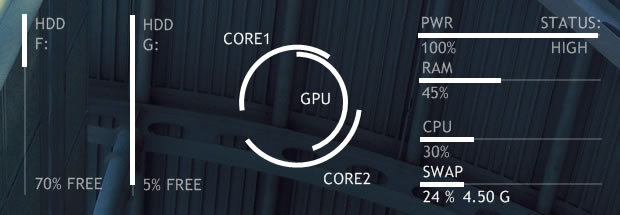
Here's a skin that's an expansion on the bars I included in [link] and ~fwjs28's suggestion to make an arc based temperature gauge.
Each of the bars is included in both horizontal and vertical format and auto-update every second. The drive letters can be changed in the relevent config files to show your own hard disks.
The temperature gauges are set to assume that 100 Celsius is the max temp, this can be changed in the formula at the top of that config if necessary (since potentially the temperature could go up to anything (unlike the limits imposed on battery/RAM/CPU) I had to include a limit of my own)).
You'll need to download and have SpeedFan running in order for the temperature gauges to work properly. I included some notes on changing the temperature config for customising it your own setup.
Let me know if there are any problems or suggestions to improve this skin and I'll look into 'em.
EDIT 26/07/09: Swap line added to config as a separate config, this was TheAslan's work based on the skins included in this set. Thanks TheAslan!
Each of the bars is included in both horizontal and vertical format and auto-update every second. The drive letters can be changed in the relevent config files to show your own hard disks.
The temperature gauges are set to assume that 100 Celsius is the max temp, this can be changed in the formula at the top of that config if necessary (since potentially the temperature could go up to anything (unlike the limits imposed on battery/RAM/CPU) I had to include a limit of my own)).
You'll need to download and have SpeedFan running in order for the temperature gauges to work properly. I included some notes on changing the temperature config for customising it your own setup.
Let me know if there are any problems or suggestions to improve this skin and I'll look into 'em.
EDIT 26/07/09: Swap line added to config as a separate config, this was TheAslan's work based on the skins included in this set. Thanks TheAslan!
Comments67
Join the community to add your comment. Already a deviant? Log In
cool