ShopDreamUp AI ArtDreamUp
Deviation Actions


Suggested Deviants


Suggested Collections


You Might Like…


Featured in Groups


Description
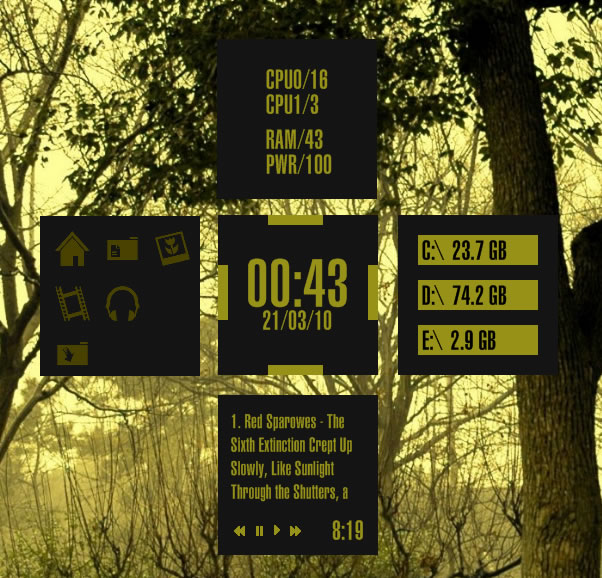
Seeing the new screenshots and hype over the Windows Mobile 7 stuff, I came up with an idea to make something similar based on the squares used as a background in that kind of theme. Here's my spin on it.
The centre square can be used to control each of the other squares, click on one of the gold squares on each of the sides of the centre square to open or close one of the side panels. You can keep all of the squares open or move the centre square to the side or corner of the desktop and keep 2 or 3 of the squares open as required.
The centre square shows the date and time, there's also a square for winamp, app launching, hdd monitoring (click on the squares that the drives are listed on to open the drives) and system monitoring.
Fonts, icons and wallpaper used are all included in the downloaded - and no, I didn't make the wallpaper.
Other details ----------------------------
24hr -> 12hr
Change the date/time format by going into the config of the centre skin and change the [MeasureTime] section to show %I:%M instead of %H:%M
American format date
Change [MeasureDate] to %m/%d/%y from %d/%m/%y
Resources used -------------------------
Ecqlipse 2 icons (colour modified) - [link]
Helvetica LT Ultra Compressed font
The centre square can be used to control each of the other squares, click on one of the gold squares on each of the sides of the centre square to open or close one of the side panels. You can keep all of the squares open or move the centre square to the side or corner of the desktop and keep 2 or 3 of the squares open as required.
The centre square shows the date and time, there's also a square for winamp, app launching, hdd monitoring (click on the squares that the drives are listed on to open the drives) and system monitoring.
Fonts, icons and wallpaper used are all included in the downloaded - and no, I didn't make the wallpaper.
Other details ----------------------------
24hr -> 12hr
Change the date/time format by going into the config of the centre skin and change the [MeasureTime] section to show %I:%M instead of %H:%M
American format date
Change [MeasureDate] to %m/%d/%y from %d/%m/%y
Resources used -------------------------
Ecqlipse 2 icons (colour modified) - [link]
Helvetica LT Ultra Compressed font
Comments13
Join the community to add your comment. Already a deviant? Log In
好酷啊!!